

Toolkit setup#
CI/CD#
What is CI/CD ?
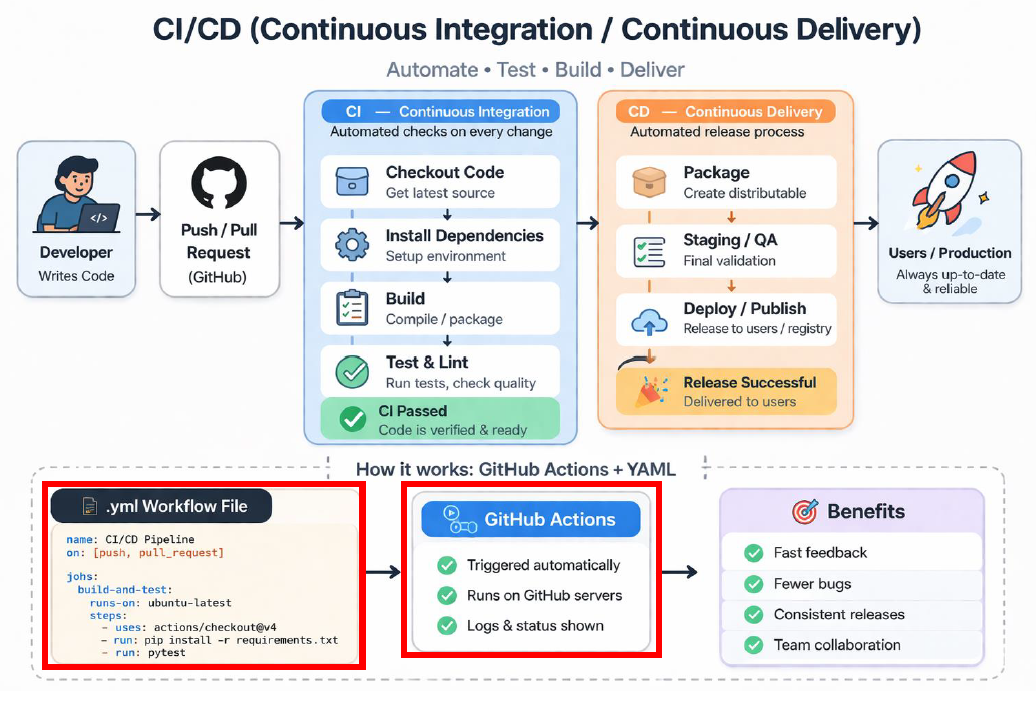
CI: Continuous Integration
CD: Continuous Delivery / Deployment
It’s a way to automate the process of building, testing, and releasing software
Continuous Integration (CI):
Every time a developer pushes code or opens a pull request (PR),the system automatically:
Builds the project
Run tests
Checks code quality
Why does it matter? Problems are caught immediately and the code base stays stable.
Continuous Deployment (CD):
After CI passes, CD takes over and packages the software and release it.
Where automation lives: GitHub Actions and the importance of the .yml file#
A very common tool for CI/CD is GitHub Actions.
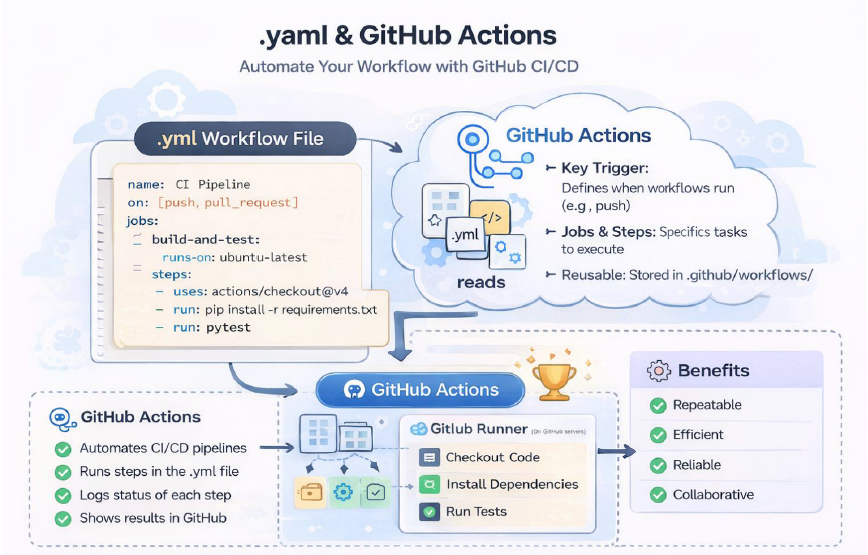
GitHub Actions lets you define workflows that run automatically when something happens in your repository (for example on a code push or when publishing a package)
The core piece that defines how to run GitHub Actions is the .yml file. The .yml file it’s a configuration file that tells GitHub which steps to run and the sequence they need to be run. It’s the core of the project CI/CD pipeline pipeline. Usually it’s found in: .github /workflows/ci ci-cd.yml.
Why .yml and GitHub Actions are important? They make the process repeatable, automated, standardized and collaborative.
File content#
What is it? A recipe that tells GitHub Actions exactly how to run your CI/CD pipeline.
It answers 4 key questions:
When to run? on : Triggers (when it
What to run? jobs: The main building blocks
Where to run? runs -on: Execution environment
How to run it? steps: The actual work
.yml file simple structure:
name: CI Pipeline

on: [push, pull_request]   #**when?** Push, pull_request , schedule, manual trigger

jobs:                      #**what?** One workflow, can run in parallel or sequentially
  test:
  runs-on: ubuntu-latest   #**where?** Ubuntu/ Windows or GitHub hosted machines
  steps:                   #**how?** Steps run commands (run) and use pre-built actions (uses)
    -run: pytest
Runners#
In GitHub Actions, a runner is the machine that executes your workflow steps. In a
.yml, runs-on: ubuntu-latest/windows-latest means “use a runner with
Ubuntu/Windows installed” or runs-on: self-hosted means “use a runner that I setup
myself”.
In a .yml file, runs-on tells the system what kind of machine (runner) should execute
the job.
ubuntu-latest or windows-latest are a virtual machines (VM) provided by GitHub where everything is pre-configured
and ready to go.
Self-hosted means you are using your own machine (or server) that you set it up by
yourself as a runner. GitHub sends jobs to this machine instead of theirs.
From code to users: Packaging and executable deployment#
CI/CD: Automates building , testing , and delivering the code. Triggers everything on push or tag.Packaging: Prepares the code to be reused. It creates installable artifacts (libraries and wheels)Tags and releases:Tag: Version maker (for example v1.0.0)
Release: Official distributed version. Often triggers CI/CD to publish artifacts.
Executable deployment: makes the code runnable without Python. Produces an .exe.
